
In This Article
Buy the wrong 3D printer for flexible filament and you’ll know about it within your first spool. TPU curls sideways in a long PTFE tube like a length of overcooked spaghetti, jams the feed path, and turns what should be a satisfying phone case or gasket into a pile of stringy regret. This is precisely the problem a direct drive FDM 3D printer solves: by mounting the extruder motor right on the print head, the filament travels barely a centimetre before it hits the hotend, rather than snaking through 400mm-plus of Bowden tubing first. Less distance means less buckling, and less buckling means TPU, TPE and other soft materials actually extrude the way the manufacturer intended.
This guide exists because most “best 3D printer” round-ups treat flexible filament as an afterthought — a single bullet point buried under ten paragraphs about PLA. We’re doing the opposite. Every machine here has been chosen, researched and compared specifically through the lens of direct drive performance, TPU compatibility and real-world extrusion reliability, drawing on manufacturer specifications and aggregated UK and international reviewer sentiment rather than marketing copy. Whether you’re commuting between PLA prototypes on a Tuesday and rubbery phone cases on a Wednesday, or you’ve simply had enough of a Bowden system chewing through your last roll of 95A, there’s a sensible pick ahead across budget, mid-range and premium tiers.
What Is a Direct Drive FDM 3D Printer?
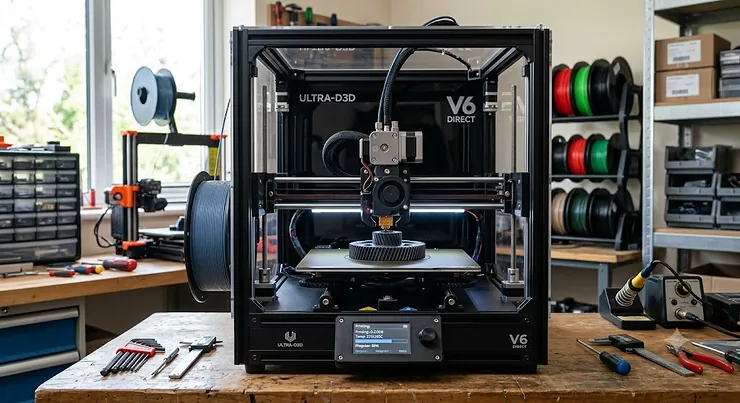
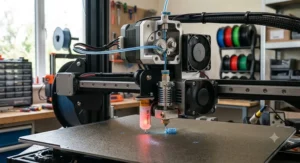
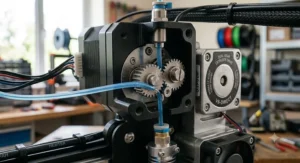
A direct drive FDM 3D printer is a fused deposition modelling machine where the extruder motor sits directly on the print head, pushing filament straight into the hotend rather than through a long Bowden tube. This short, direct path gives far better control over soft, flexible materials like TPU, along with sharper retraction and less stringing on tricky prints.
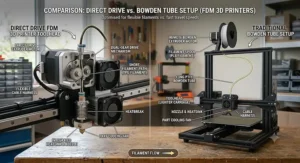
The distinction matters more than most spec sheets let on. As Wikipedia’s entry on fused filament fabrication explains, filament is fed from a spool through a moving, heated printer extruder head and deposited layer by layer to build an object — but how that filament gets from spool to nozzle is where direct drive and Bowden setups part ways entirely. On a Bowden machine, the motor sits back on the frame and shoves filament through a metre or more of PTFE tubing before it reaches the hotend. On a direct drive FDM 3D printer, that whole detour disappears — the motor is bolted right onto the toolhead, filament travels a couple of centimetres, and the printer gets near-instant, precise control over exactly how much material goes in and out of the nozzle.
Quick Comparison Table
| Printer | Extruder Type | Build Volume | Max Speed | Best For |
|---|---|---|---|---|
| Bambu Lab A1 Mini | Direct Drive (single gear) | 180 x 180 x 180 mm | 500 mm/s | Beginners on a tight budget |
| Creality Ender-3 V3 KE | Sprite Direct Drive | 220 x 220 x 240 mm | 500 mm/s | Best value upgrade path |
| Elegoo Neptune 4 Pro | Dual-Gear Direct Drive | 225 x 225 x 265 mm | 500 mm/s | Budget TPU printing |
| Sovol SV07 Plus | Planetary Dual-Gear Direct Drive | 300 x 300 x 350 mm | 500 mm/s | Large flexible-filament prints |
| Creality K1C | All-Metal Direct Drive | 220 x 220 x 250 mm | 600 mm/s | Speed with carbon-fibre & TPU |
| Bambu Lab P1S | Direct Drive (enclosed) | 256 x 256 x 256 mm | 500 mm/s | Multi-material colour printing |
| Prusa MK4S | Nextruder Direct Drive | 250 x 210 x 220 mm | High-flow (24 mm³/s) | Long-term reliability |
Look at that table for more than five seconds and a pattern emerges: every single entrant runs a direct drive extruder, because that’s non-negotiable if flexible filament is on your printing agenda, but the price-to-capability curve is anything but linear. The Bambu Lab A1 Mini and Creality Ender-3 V3 KE get you into direct drive territory for very little outlay, while the Prusa MK4S asks for a genuinely premium budget in exchange for a planetary-geared Nextruder that’s engineered to shrug off years of abuse. In the middle, the Elegoo Neptune 4 Pro and Sovol SV07 Plus carve out a sweet spot for hobbyists who want dual-gear grip on soft filament without remortgaging anything, and the Creality K1C and Bambu Lab P1S occupy the enclosed, high-speed bracket where TPU printing meets genuine production throughput.
💬 Just one click — help others make better buying decisions too!😊
Direct Drive Extruder 3D Printer vs Bowden: The Real Difference
Here’s the bit most listings gloss over: a direct drive extruder 3D printer and a Bowden machine can use the exact same nozzle, the exact same slicer settings, and still produce wildly different TPU results. The difference isn’t marketing spin — it’s physics. TPU with a Shore hardness around 85A-95A behaves like a soft rubber band under compression. Push it through a metre of Bowden tube and it has room to bow outward at every bend, buckling instead of advancing. Direct drive machines eliminate almost all of that unsupported length, so the gears grip filament that’s still rigid enough to be pushed in a straight line.
What most buyers overlook about this trade-off is that Bowden setups aren’t universally worse — they’re lighter on the toolhead, which historically meant less wobble at high speed, and cheaper to manufacture, which is why budget printers defaulted to Bowden for years. But the CoreXY revolution led by machines like the Bambu Lab A1 Mini and Bambu Lab P1S has largely closed that speed gap: lightweight direct drive motors and clever input-shaping firmware mean modern direct drive printers hit 500mm/s without the toolhead becoming an unbalanced mess. Reviewers consistently note that once you’ve printed flexible filament on a genuine direct drive FDM 3D printer, going back to a Bowden machine for TPU feels like trying to thread a needle while wearing oven gloves — technically possible, mostly miserable.
The practical upshot for buyers: if flexible filament, nylon, or anything above 70A hardness is anywhere on your printing wish list, direct drive isn’t a nice-to-have, it’s the entry requirement. Everything covered from here on satisfies that requirement by design.
Top 7 Direct Drive FDM 3D Printers: Expert Analysis
1. Bambu Lab A1 Mini — best beginner-friendly compact direct drive
The Bambu Lab A1 Mini punches well above its size, cramming CoreXY-grade calibration into a bed-slinger footprint that fits on a bedside table. Bambu’s engineering here is genuinely clever for the price bracket.
Its all-metal direct drive extruder hits a 300°C max nozzle temperature and pairs with an eddy-current flow sensor that actively measures nozzle pressure and adjusts extrusion on the fly — a feature normally reserved for machines twice the price. Independent reviewers repeatedly single out the A1 Mini as a standout example of a small cantilever printer design with a lightweight direct extruder mounted right on its printhead, which is exactly why TPU behaves itself here in a way it simply doesn’t on cheap Bowden alternatives. Based on the spec comparison, the 180 x 180 x 180 mm build volume is genuinely limiting for anything beyond small functional parts, phone cases or gasket prototypes — this isn’t the machine for a cosplay helmet.
Reviewers consistently praise the price-to-performance ratio and the sub-48dB quiet mode, alongside the fully automatic bed levelling that removes the single biggest source of beginner frustration. The trade-off, as multiple independent testers note, is that the small build plate and lack of an enclosure limit it to lower-temperature materials — brilliant for PLA and TPU, less so for ABS.
Pros:
- ✅ Fully automatic calibration removes nearly all setup friction
- ✅ Sub-48dB quiet mode genuinely liveable near a desk
- ✅ 300°C hotend handles TPU, PETG and PLA with ease
Cons:
- ❌ 180mm cubed build volume rules out larger projects
- ❌ No enclosure limits high-temperature engineering filaments
At the time of research, the Bambu Lab A1 Mini sits in the £170-220 range for the standalone unit, climbing toward the mid-£200s bundled with the AMS Lite for multi-colour work — for beginners who want direct drive TPU printing without a steep learning curve, it’s hard to beat.
2. Creality Ender-3 V3 KE — best value Sprite extruder upgrade path
If the name “Ender 3” makes you think of wobbly acrylic frames and Bowden tubes flapping in the breeze, the Creality Ender-3 V3 KE is a different animal entirely. Creality borrowed the ceramic-heated hotend from its flagship K1 and bolted it to a proper Sprite direct drive extruder.
The 220 x 220 x 240 mm build volume is a genuine step up from the A1 Mini, and independent testing found the machine has a top speed of 500 mm/s with a maximum acceleration of 8000 mm/s², making it nearly as fast as the popular Creality K1. What that means in practice: layer lines that used to take 45 minutes on an old Ender 3 now finish in under 20, and the Sprite extruder’s stronger grip means 95A TPU pulls through cleanly rather than skipping teeth on the drive gear. Here’s what to weigh — this is Creality’s open-source Klipper implementation, so tinkerers get full access to tune input shaping themselves, but reviewers have flagged that Creality’s own Klipper interface is somewhat limited compared with a vanilla install.
Aggregated review sentiment across UK and US retailers repeatedly highlights the printer’s auto bed levelling and its ability to self-set Z height, removing two of the most fiddly setup steps on cheaper bed-slingers.
Pros:
- ✅ Sprite direct drive extruder shares DNA with Creality’s flagship K1
- ✅ 500 mm/s top speed with genuinely usable auto levelling
- ✅ Open-source Klipper firmware invites deeper tuning
Cons:
- ❌ No accelerometer included out of the box
- ❌ Stock Klipper interface feels restrictive versus a full install
Priced around £180-230 at the time of writing, this is arguably the strongest value argument on this entire list for anyone stepping up from a Bowden Ender 3.
3. Elegoo Neptune 4 Pro — best dual-gear TPU performer on a budget
Elegoo’s answer to the “budget printer that can’t handle TPU” problem is a dual-gear direct drive extruder that’s genuinely built with soft filament in mind, not bolted on as an afterthought.
Elegoo’s proprietary Dual Gear Direct Drive extruder on the Neptune 4 Pro is 25% lighter than the extruder used on the Neptune 3 Pro, delivering greater extrusion force and a 5.2x extrusion ratio for higher printing accuracy. What most buyers overlook about extrusion ratio is that it directly determines how much torque the motor can apply before filament simply strips inside the gears — a higher ratio means TPU gets gripped hard enough to actually move, rather than grinding a flat spot into the filament and stalling mid-print. Reviewers consistently describe the Neptune 4 Pro as a genuine “top-rated” pick in its price bracket, and the printer’s 121-point automatic mesh bed levelling combined with a magnetic flexible removable PEI platform means excellent part adhesion without needing glue stick for most materials.
The 225 x 225 x 265 mm build volume splits the difference nicely between the compact A1 Mini and the larger machines further down this list, and the 300°C hotend ceiling gives enough headroom for engineering nylon blends alongside TPU.
Pros:
- ✅ Dual-gear direct drive purpose-built for flexible filament grip
- ✅ 121-point auto levelling removes most bed-prep frustration
- ✅ Klipper-based firmware unlocks input shaping tuning
Cons:
- ❌ Assembly required — not a fully pre-built unit
- ❌ Stock cooling fans are noticeably audible at full tilt
Expect to pay in the £190-240 range, making this one of the strongest cost-per-successful-TPU-print machines on the market right now.
4. Sovol SV07 Plus — best large-volume Klipper direct drive
For anyone who’s ever had to slice a design into three parts because the bed was too small, the Sovol SV07 Plus solves that headache with a genuinely generous chamber and Klipper running natively out of the box.
The Sovol SV07 Plus offers a 300 x 300 x 350mm build volume with a dual-gear direct drive extruder, a maximum print speed of 500 mm/s and a recommended working speed of 250 mm/s, alongside a maximum nozzle temperature of 300°C. Based on the spec comparison, that build volume roughly triples the print area of the A1 Mini, which matters enormously for anyone printing large flexible components like phone cases in batches, drone parts, or shoe insoles that simply won’t fit on a smaller plate. Reviewers note that running Klipper out of the box saves buyers the hassle of a separate display or Klipper-conversion process that competing budget machines often still require.
What the spec sheet won’t tell you, but reviewer consensus suggests, is that the traditional V-slot wheel design trades a little rigidity for cost savings versus linear rails — fine for most hobbyist use, but something serious high-speed printers will eventually want to upgrade.
Pros:
- ✅ 300 x 300 x 350mm build volume among the largest here
- ✅ Klipper firmware pre-installed with a 5-inch touchscreen
- ✅ Planetary dual-gear extruder built specifically for flexible filament
Cons:
- ❌ V-slot wheels less rigid than linear rail alternatives
- ❌ Bed levelling still relies partly on manual screws
At around £270-330, it’s the mid-range pick for anyone whose flexible filament ambitions have outgrown a 220mm bed.
5. Creality K1C — best high-speed enclosed direct drive for carbon-fibre & TPU
The Creality K1C is what happens when Creality decides speed and material versatility aren’t mutually exclusive. This is a proper enclosed CoreXY machine, and the “C” genuinely stands for carbon — but don’t let that fool you into thinking TPU is an afterthought.
The K1C combines an all-metal direct drive extruder system with a clog-free design, a dynamic CoreXY structure capable of 600 mm/s maximum print speed and 20,000 mm/s² acceleration, alongside a quick-swap tri-metal “Unicorn” nozzle and titanium-alloy heatbreak. Here’s what to weigh: the direct drive extruder is rated to 300°C and capable of roughly 32mm³/s of filament flow — almost a full cubic centimetre of plastic per second, which is genuinely high-end volumetric throughput for this price point. The enclosed chamber design isn’t just about aesthetics; the K1C’s closed build chamber creates a stable printing environment for materials such as ABS, PLA, PETG, TPU, PA, ASA and PC, plus their carbon-fibre reinforced versions, meaning warping-prone engineering filaments finally behave.
Reviewers consistently flag the auto-calibration routine — the printer physically shakes itself to measure resonance before every print — as removing one of the most tedious high-speed printing chores entirely.
Pros:
- ✅ 600 mm/s top speed with genuine carbon-fibre compatibility
- ✅ Enclosed chamber stabilises temperature-sensitive materials
- ✅ Quick-swap Unicorn nozzle speeds up maintenance
Cons:
- ❌ Fan noise at full cooling can exceed 50dBA
- ❌ Premium components push it above pure-budget territory
Priced roughly £380-450 depending on retailer promotions, the K1C earns its keep for makers who genuinely print a mix of TPU, nylon and reinforced filaments regularly.
6. Bambu Lab P1S — best enclosed CoreXY with multi-material AMS
The Bambu Lab P1S takes the acclaimed X1 Carbon platform and strips away the LiDAR sensor to hit a genuinely accessible price point without sacrificing the core printing experience.
The P1S inherits the proven CoreXY kinematics of Bambu’s flagship printer, reaching up to 20,000 mm/s² acceleration with active vibration compensation and pressure advance for smooth, consistent extrusion. Its direct-drive extruder is specifically engineered with flexible filament in mind — Bambu’s own documentation notes that because the motor is directly connected to the extruder, the P1 series has better control over the extrusion and retraction of flexible filaments, delivering precise and consistent output for smooth, blur-free prints. What most buyers overlook is that the enclosure isn’t just cosmetic: it maintains stable ambient chamber temperature, which matters just as much for TPU dimensional accuracy as it does for ABS warping.
Elegoo’s rival aside, Bambu itself lists TPU alongside PLA, PETG, PVA, PET, ABS and ASA as ideal supported filaments for the P1S, and pairing it with the optional AMS unit opens up multi-colour, multi-material single prints — genuinely useful if you’re combining a rigid PLA shell with a flexible TPU grip in one object.
Pros:
- ✅ 20,000 mm/s² acceleration with genuinely fast real-world prints
- ✅ Enclosed chamber stabilises TPU and engineering filaments alike
- ✅ Optional AMS enables multi-colour, multi-material single prints
Cons:
- ❌ AMS is sold separately, adding meaningfully to total cost
- ❌ Carbon/glass-fibre filaments aren’t officially recommended
Standalone units sit around £320-400 at the time of research, with AMS-equipped combos climbing into the £420-520 range — a strong middle ground between hobbyist and semi-professional output.
7. Prusa MK4S — best premium reliability with planetary Nextruder
Prusa’s reputation as the “gold standard” of desktop FDM didn’t happen by accident, and the Prusa MK4S is the clearest distillation yet of what over a decade of open-hardware iteration looks like.
The Nextruder v2 uses a 4:1 gear ratio with ground spur gears and a hardened steel drive shaft for improved reliability, while the CHT-based high-flow nozzle raises volumetric flow from 16 to 24 mm³/s — enabling roughly 50% faster print speeds on PLA and PETG compared with the standard MK4. On paper this means faster prints without sacrificing the dimensional accuracy Prusa built its name on; in practice, reviewers awarding it Editor’s Choice status back that up. The 360-degree turbine cooling system supports overhangs up to 75 degrees without needing supports — genuinely useful when TPU parts feature curved or angled geometry that would otherwise sag mid-print.
What the spec sheet won’t tell you, but long-term owner reports suggest, is that Prusa’s planetary-geared direct drive extruder is engineered for years of continuous service — the same philosophy that’s kept MK3-series machines running in classrooms and workshops half a decade after release. Wide material compatibility including PLA, PETG, TPU, ASA and ABS is standard, and the printer supports up to five materials simultaneously with an optional MMU3 upgrade for those who want to go further.
Pros:
- ✅ Planetary Nextruder built for years of reliable service
- ✅ 24 mm³/s high-flow nozzle roughly 50% faster than the base MK4
- ✅ 360-degree cooling handles steep overhangs without supports
Cons:
- ❌ Premium price sits well above every other pick here
- ❌ Open-frame design lacks a built-in enclosure
At the time of research, kits sit around £850-950 with fully assembled units nudging toward £950-1,050 — a genuine investment, but one aimed at buyers who value longevity over a lower entry price.
What Makes a TPU-Friendly 3D Printer? The Extruder for Flexible Filament Explained
Not every direct drive machine handles flexible filament equally well, and this is where a genuinely TPU-friendly 3D printer separates itself from one that merely tolerates the stuff. Three factors matter more than any spec sheet headline: gear design, retraction distance, and heat management.
Gear design comes first. A single-gear extruder for flexible filament, like the one on the entry-level Bambu Lab A1 Mini, grips filament from one side only — perfectly fine for 95A TPU, but it can slip on softer 85A blends under sustained pressure. Dual-gear designs, seen on the Elegoo Neptune 4 Pro and Sovol SV07 Plus, clamp filament from both sides simultaneously, which is why reviewers consistently rate them slightly ahead for genuinely soft, rubbery materials. Retraction distance matters just as much: because direct drive extruders sit millimetres from the melt zone, they can use short retractions of 0.5-2mm rather than the 6-8mm a Bowden system needs to compensate for tube slack — and every extra millimetre of retraction on TPU is another chance for the filament to buckle rather than pull back cleanly.
Heat management rounds out the picture. The spec sheet won’t tell you this, but reviewer consensus is consistent: TPU prints best at slower speeds — typically 20-40mm/s — with a hotend that maintains rock-steady temperature rather than fluctuating between layers, which is exactly why the all-metal, high-flow hotends found on the Creality K1C and Prusa MK4S produce noticeably fewer under-extrusion gaps on flexible parts than budget hotends with looser thermal tolerances.
How to Choose a Direct Drive FDM 3D Printer
- Confirm it’s genuinely direct drive, not Bowden with marketing spin. Check the extruder type explicitly in the spec sheet — “direct drive” should be stated, not implied.
- Match build volume to your actual projects, not your ambitions. A 180mm bed is fine for phone cases; cosplay armour needs 300mm-plus.
- Check the maximum nozzle temperature. 260°C handles PLA and most TPU comfortably; 300°C future-proofs you for nylon and polycarbonate blends.
- Look for dual-gear extruders if soft (85A or below) TPU is a priority. Single-gear designs can slip under sustained pressure with genuinely soft filament.
- Weigh enclosed versus open-frame based on your material roadmap. An enclosure stabilises TPU dimensional accuracy and is essential for ABS/ASA.
- Factor in firmware. Klipper-based machines (Sovol, Elegoo, Creality’s KE line) offer more tuning headroom than closed proprietary firmware.
- Budget for consumables, not just the printer. Nozzles wear faster with abrasive or carbon-fibre filaments, so factor spare parts into total cost.
For a broader primer on build volume, resolution and material trade-offs beyond flexible filament specifically, RS Components’ independent 3D printer buying guide is a genuinely useful supplementary read for anyone still weighing up their first machine.
Common Mistakes When Buying a Direct Drive FDM 3D Printer
Even seasoned hobbyists trip over the same handful of buying mistakes, and they’re almost always avoidable with a little forethought.
The first is assuming “direct drive” automatically means “TPU-ready.” As covered above, single-gear direct drive extruders can still slip on very soft filament — checking for dual-gear or planetary designs (like the Elegoo Neptune 4 Pro or Prusa MK4S) avoids a frustrating surprise. The second mistake is under-buying build volume, then discovering three months later that every interesting project needs splitting across multiple prints — a false economy that costs more in adhesive, alignment headaches and print time than simply buying one size up initially. The third, and perhaps most common, is ignoring the enclosure question entirely: buyers who plan to print ABS, ASA or nylon on an open-frame machine like the Bambu Lab A1 Mini often find warping ruins otherwise-successful prints, something an enclosed machine like the Creality K1C avoids by design.
A fourth, quieter mistake is skipping firmware research. Machines running Klipper natively — the Sovol SV07 Plus, Elegoo Neptune 4 Pro, and Creality Ender-3 V3 KE among them — unlock input shaping and pressure advance tuning that proprietary firmware sometimes locks away, which matters enormously once you start pushing TPU settings beyond factory defaults.
A fifth mistake, easy to overlook amid all the spec-chasing, is skipping conformity checks entirely. Any 3D printer sold in Great Britain should carry UKCA (or, during the current transitional recognition period, CE) marking, and official government guidance on the UKCA marking confirms manufacturers must demonstrate conformity with relevant UK product safety legislation before goods can legally be placed on the GB market. It’s a quick check worth making before checkout, not after.
Direct Drive Extruder 3D Printer for Different Users: Beginners, Makers & Small Business
A Bambu Lab A1 Mini or Creality Ender-3 V3 KE suits absolute beginners perfectly — low financial risk, minimal setup friction, and a direct drive extruder capable of handling the TPU phone cases and gaskets that make up most first-year hobbyist projects. Intermediate makers who’ve outgrown a 220mm bed and want genuine Klipper tuning headroom should look at the Elegoo Neptune 4 Pro or Sovol SV07 Plus, both of which balance dual-gear grip with a larger working area for batch production of small flexible parts.
Small businesses and prosumers producing functional prototypes at volume are better served further up the list. The Creality K1C‘s 600mm/s ceiling and carbon-fibre compatibility make it genuinely useful for engineering-grade parts that need to survive real-world stress, while the Bambu Lab P1S with an AMS attached suits anyone combining materials — a rigid PLA shell bonded to a flexible TPU grip, for instance — in a single automated print run. For workshops, schools, or anyone who simply can’t afford downtime, the Prusa MK4S‘s reputation for multi-year reliability under near-continuous use is worth the premium; it’s the printer equivalent of buying tools you’ll still be using in a decade.
What to Expect: Real-World Performance with Flexible Filament
Specs on a page rarely translate directly into what actually happens when TPU starts feeding through the hotend, so here’s the honest, unglamorous version. Expect to slow down. Even the fastest direct drive machines on this list — the Creality K1C‘s 600mm/s ceiling included — need TPU dialled back to roughly 20-40mm/s for clean layer adhesion, because flexible filament simply can’t be shoved through a nozzle at the speeds rigid PLA tolerates without under-extruding.
Expect some trial and error with retraction settings, too. Even on genuinely well-designed direct drive extruders like the planetary Nextruder in the Prusa MK4S, dialling in the right retraction distance and speed for a specific TPU brand — Shore hardness varies meaningfully between manufacturers — typically takes two or three calibration prints before results click into place. And expect first-layer adhesion to matter more than usual: TPU’s slight tackiness means a poorly levelled bed either squishes the first layer flat or leaves gaps that telegraph through the entire print. The auto-levelling systems on machines like the Elegoo Neptune 4 Pro and Bambu Lab A1 Mini genuinely earn their keep here, removing one major variable from an already fiddly material.
Practical Usage Guide: Setting Up Your Direct Drive Extruder for TPU
Getting a new direct drive FDM 3D printer dialled in for flexible filament doesn’t need to be a weekend project, provided you follow a sensible order of operations.
First 30 minutes — mechanical setup: Before touching any filament, confirm the bed is level (or trust the auto-levelling routine on machines like the A1 Mini or Neptune 4 Pro), and check the extruder’s idler tension is snug but not crushing — over-tightened gears actually chew into softer TPU rather than gripping it cleanly. First hour — slicer profile: Drop your print speed to 20-30mm/s for TPU specifically, disable retraction distance beyond 1-2mm on genuine direct drive setups, and set nozzle temperature 5-10°C above the filament’s recommended range to ensure full melt-through without stringing. First week — maintenance rhythm: Wipe down the nozzle after every TPU session while still warm (with the printer powered down and cooled to a safe handling temperature) — TPU residue hardens into a stubborn film that PLA doesn’t leave behind. Common early mistake to avoid: printing TPU immediately after PETG without a proper cold-pull cleaning cycle, since residual PETG can contaminate the melt chamber and cause inconsistent extrusion for several subsequent prints.
Optimisation tricks that Amazon listings never mention: slightly increasing part cooling fan speed for TPU (counter to PLA convention) helps thin-walled sections hold their shape before the material has a chance to sag, and printing TPU on a slightly cooler bed than PLA — around 40-50°C rather than 60°C — reduces the risk of the flexible material fusing too aggressively to a PEI sheet.
Real-World Scenarios: Who Should Buy Which Printer
Consider Priya, a university student sharing a small flat, printing occasional phone cases and cable organisers between lectures. Budget is tight, desk space is tighter, and she has zero interest in tuning firmware. The Bambu Lab A1 Mini fits this profile precisely — quiet enough for a shared room, automated enough to ignore, and cheap enough that a failed print doesn’t sting.
Now consider Marcus, a hobbyist woodworker who’s started designing custom jig components and the occasional flexible drawer-liner insert for his workshop. He’s outgrown a 220mm bed, wants Klipper’s tuning depth, and doesn’t mind assembling a printer himself. The Sovol SV07 Plus or Elegoo Neptune 4 Pro suit that use case — larger build volume, genuine dual-gear grip, and enough firmware access to dial in exactly the retraction curve his specific TPU brand needs.
Finally, consider Aisha, who runs a small Etsy shop selling custom pet-tag holders combining rigid PLA bodies with flexible TPU straps, and needs consistent output across dozens of units weekly. Downtime costs her real money. The Bambu Lab P1S with an AMS attachment, or the workshop-grade Prusa MK4S, both make sense here — the former for automated multi-material batches, the latter for sheer mechanical longevity under daily commercial use.
Problem → Solution: Fixing Common Flexible Filament Printing Issues
Problem: TPU strings badly between print features. Solution: Reduce retraction distance to under 2mm on direct drive setups and lower print temperature by 5°C — most stringing on genuine direct drive machines comes from excess heat rather than insufficient retraction. Problem: Filament grinds a flat spot and stops feeding. Solution: Check idler tension isn’t over-tightened, and switch to a dual-gear extruder like the one on the Elegoo Neptune 4 Pro if you’re consistently pushing softer 85A materials. Problem: First layer won’t adhere properly. Solution: Drop bed temperature slightly for TPU (40-50°C rather than PLA’s 60°C) and re-run auto bed levelling — TPU is more sensitive to nozzle-to-bed gap than rigid filaments.
Problem: Prints come out under-extruded despite correct flow settings. Solution: This is frequently a heat-soak issue — increase nozzle temperature 5-10°C above the filament manufacturer’s suggested range, since TPU needs slightly more thermal energy to fully melt than its Shore hardness rating might suggest. Problem: Warping on larger flexible parts. Solution: An enclosed chamber, like that on the Creality K1C or Bambu Lab P1S, largely solves this by maintaining stable ambient temperature; on open-frame machines, a simple cardboard draft shield around the print area helps considerably.
Long-Term Cost & Maintenance of Direct Drive Extruders
Total cost of ownership on a direct drive FDM 3D printer extends well beyond the sticker price, and TPU printing specifically accelerates a few wear items worth budgeting for. Nozzles wear faster when cycling between abrasive carbon-fibre filaments and softer TPU, so machines like the Creality K1C that ship with hardened, quick-swap nozzles offer genuine long-term savings versus constantly replacing brass nozzles on cheaper machines. Extruder gears themselves — particularly on dual-gear or planetary designs like the Prusa MK4S‘s Nextruder — are engineered for a longer service life, and Prusa’s own community has documented MK3-series extruders still running reliably after years of continuous classroom and workshop use, a track record that genuinely factors into the MK4S’s premium price.
Electricity costs are modest but not zero: a typical direct drive machine draws 150-350W during active printing, meaning even frequent TPU sessions add only a few pounds monthly to a household bill at current UK energy rates. The bigger long-term expense is filament itself — TPU typically costs somewhat more per kilogram than standard PLA — so buyers printing flexible parts regularly should weigh cost-per-successful-print rather than cost-per-roll, since a printer with reliable auto-levelling and dual-gear grip wastes meaningfully less filament to failed prints over a year of ownership.
Safety & Regulations: Printing Flexible Filament Safely in the UK
Direct drive FDM 3D printers are widely available consumer electronics, but that doesn’t mean safety considerations disappear once the box arrives. Chief among them: fume and particle emissions during printing. Guidance on 3D printer use notes that concerns have been raised about potential inhalation exposure to ultrafine particles and fumes, and recommends adopting control measures at source to manage exposure to volatile organic compounds and large numbers of ultrafine particles, particularly for anyone with existing respiratory conditions such as asthma. Practically, this means printing in a well-ventilated room, favouring enclosed machines like the Creality K1C or Bambu Lab P1S for higher-temperature materials, and avoiding running a printer unattended for hours in a small, poorly aired bedroom. Full guidance on managing these risks is available via University of Edinburgh Health & Safety’s 3D printer guidance, which covers hazard assessment and recommended control measures in detail.
✨ Don’t Miss These Exclusive Deals!
🔍 Take your 3D printing setup to the next level with these carefully selected direct drive picks. Click on any highlighted product to check current pricing and availability — these machines will help you create authentic, flexible-filament projects your family will actually use!
FAQ
❓ What's the difference between a direct drive and Bowden 3D printer?
❓ Can any direct drive FDM 3D printer print TPU straight out of the box?
❓ Do I need an enclosed printer for flexible filament?
❓ What print speed should I use for TPU on a direct drive extruder?
❓ Is a direct drive extruder 3D printer worth it if I mostly print PLA?
Conclusion
Choosing the right direct drive FDM 3D printer ultimately comes down to matching machine capability to what you’ll actually print, not what the spec sheet makes you dream about printing. If TPU phone cases and the occasional gasket are the extent of your ambitions, the Bambu Lab A1 Mini or Creality Ender-3 V3 KE deliver genuine direct drive reliability without asking much of your wallet. If you’re producing flexible parts in volume, or juggling engineering filaments alongside TPU, the Elegoo Neptune 4 Pro, Sovol SV07 Plus or Creality K1C each offer a sensible step up in either build volume, speed or material versatility. And if longevity under near-daily use matters more than upfront cost, the Bambu Lab P1S and Prusa MK4S both justify their higher price tags with genuinely engineered extruder systems built to outlast several cheaper machines combined.
Whichever tier fits your budget, the underlying lesson holds across all seven picks: a direct drive extruder isn’t a premium add-on anymore, it’s the baseline requirement for anyone serious about printing flexible filament reliably in 2026.
Recommended for You
- Multi-Colour FDM 3D Printer: 7 Best Picks Tested for 2026
- Large Format FDM 3D Printer: 7 Big-Build Picks for 2026
- Enclosed FDM 3D Printer for ABS: 7 Picks Tested for 2026 (No Warping)
Disclaimer: This article contains affiliate links. As an Amazon Associate, I earn from qualifying purchases. If you purchase products through these links, we may earn a small commission at no additional cost to you.
✨ Found this helpful? Share it with your friends! 💬🤗
