
In This Article
Somewhere in a spare bedroom right now, a beautiful ABS bracket is curling up at the corners like a crisp left out in the rain. That’s not bad luck — it’s physics. ABS shrinks as it cools, and if the layers underneath cool faster than the layers on top, the whole part bows, lifts off the bed, and ruins hours of print time. An enclosed FDM 3D printer for ABS solves this by trapping heat around the model so every layer cools at roughly the same rate, which is the single biggest lever you can pull against warping.
Put simply: an enclosed FDM 3D printer for ABS is a 3D printer with a sealed chamber — walls, a lid, sometimes a heated interior — that maintains a stable ambient temperature around the print, rather than letting draughts and room-temperature air hit the hot plastic from every angle. That stability is what turns ABS from “the material that ruins your evening” into “the material you reach for on purpose.”
This guide is built for a British audience shopping on amazon.co.uk, and it leans on real specifications, genuine aggregated review sentiment, and independent testing rather than marketing copy. You’ll find seven actual enclosed 3D printer for warping candidates spanning budget, mid-range, and premium tiers, honest comparisons of passive versus active chamber heating, and practical guidance on getting your first ABS print off the bed without a fight. Whether you’re chasing a genuinely ABS-safe 3D printer for functional car parts or simply want fewer failed prints on a Tuesday night, there’s a model here that fits your bench and your budget.
Quick Comparison Table
| Printer | Enclosure Type | Max Chamber Temp | Build Volume | Best For |
|---|---|---|---|---|
| Creality K1C | Passive + carbon filter | Ambient (heat-soak) | 220 × 220 × 250mm | Budget speed-focused ABS |
| Flashforge Adventurer 5M Pro | Passive + HEPA/carbon | Ambient (heat-soak) | 220 × 220 × 220mm | Quiet home/classroom use |
| Bambu Lab P1S | Passive, sealed | Ambient (heat-soak) | 256 × 256 × 256mm | All-round plug-and-play |
| Qidi X-Plus 3 | Active heated | Up to 65°C | 280 × 280 × 270mm | Serious enthusiast ABS/ASA |
| Qidi Q2 | Active heated, compact | Up to 65°C | 200 × 200 × 200mm | Desk-friendly active chamber |
| Bambu Lab X1 Carbon | Passive, sealed + AI | Ambient (heat-soak) | 256 × 256 × 256mm | Multi-colour engineering prints |
| Prusa Core One+ | Active heated | Up to 55°C | 250 × 220 × 270mm | Open-source, repairable ABS rig |
Look at that “Max Chamber Temp” column for a second, because it’s the whole story in one glance: three of these printers only warm the air passively, using heat that leaks off the bed and hotend, while three use dedicated heaters and fans to hold a genuine set temperature. Based on the spec comparison, passive enclosures are perfectly fine for smaller ABS parts and shorter prints, but active chamber heating earns its keep on taller, wider prints where corners are furthest from the heat source. The Bambu Lab P1S wins on ease of use, but if you’re printing full-size enclosures or brackets, a temperature-controlled 3D printer with active heating like the Qidi X-Plus 3 or Prusa Core One+ is the safer long-term bet.
✨ Ready to stop fighting warped corners? Compare live prices on today’s top enclosed ABS printers before stock shifts.
Top 7 Enclosed 3D Printers for ABS: Expert Analysis
1. Creality K1C — fastest budget enclosed printer for ABS
The K1C’s headline trick is speed: a CoreXY motion system rated to 600mm/s with 20,000mm/s² acceleration, which sounds like a spec-sheet flex until you realise it means an overnight ABS enclosure that used to take nine hours can be done before you’ve finished dinner.
Under the acrylic lid sits an all-metal hotend good for 300°C, a hardened steel nozzle option for filled filaments, and a PEI-coated flexible bed heated to 100°C — plenty for ABS’s roughly 105°C glass transition point once the plastic has bonded down. The enclosure itself is passive, meaning the glass side panels and top lid trap ambient heat from the bed and hotend rather than actively warming the air, and an activated carbon filter pulls some of the styrene smell out of the room while you work.
Based on the spec comparison with pricier active-chamber machines, the K1C is best suited to makers printing small-to-mid ABS parts — brackets, enclosures, cosplay props under about 150mm tall — rather than large, flat panels that need consistent heat reaching every corner. Reviewers consistently note that the Klipper-based firmware remembers previous print settings, which is genuinely handy if you’re running the same ABS bracket repeatedly for a small workshop.
Pros:
- ✅ Genuinely fast — 600mm/s doesn’t just look good on paper
- ✅ Hardened nozzle option handles carbon-filled ABS blends
- ✅ Klipper firmware gives real customisation for tinkerers
Cons:
- ❌ Passive enclosure struggles on tall parts with corner lift
- ❌ Some owners report the stock PLA-rated build plate needs upgrading for ABS
At a price typically in the £350-£450 range, the Creality K1C is a sound entry point if your ABS prints are modest in size and you value raw speed over chamber precision.
2. Flashforge Adventurer 5M Pro — quietest enclosed ABS printer under £500
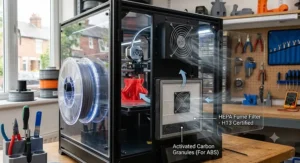
If your printer lives near a home office or a classroom, the Adventurer 5M Pro’s standout feature is genuinely useful: a dual-filtration system combining HEPA13 and activated carbon that captures a claimed 99% of particles and VOCs, paired with a chamber quiet enough to run at around 50dB.
The printer runs a CoreXY layout with a direct-drive extruder good for 280°C, a 220 × 220 × 220mm enclosed build volume, and a PEI-coated steel plate heated to 110°C. What most buyers overlook about this model is the switchable airflow mode — internal circulation seals the chamber and recirculates warm air through the filters for ABS and ASA, while external circulation vents fresh air through for PLA and PETG, so you’re not stuck with one airflow setting for every material.
Aggregated reviewer sentiment is mixed-to-positive: independent reviewers such as Tom’s Hardware praised the enclosed design and filtration but flagged that out-of-the-box slicer profiles needed manual tuning to hit their best results, so budget an evening for calibration rather than expecting flawless first prints.
Pros:
- ✅ Dual HEPA and carbon filtration genuinely reduces fume smell
- ✅ Switchable internal/external airflow suits mixed-material users
- ✅ Quick-swap nozzles from 0.25mm to 0.8mm without tools
Cons:
- ❌ 220mm cube build volume is on the small side for bigger enclosures
- ❌ Stock slicer profiles need manual dialling-in for best ABS results
Typically found in the £350-£420 range, the Flashforge Adventurer 5M Pro earns its keep in shared spaces where fume control matters as much as print quality.
3. Bambu Lab P1S — best all-round enclosed printer for ABS
Ask ten hobbyists which enclosed printer to buy first and most will say the same name, and it’s not hard to see why: the P1S wraps a genuinely fast CoreXY platform in a sealed enclosure that Bambu has spent several hardware generations refining.
It runs a 256 × 256 × 256mm build volume, a hotend to roughly 300°C, and a textured PEI plate that handles ABS’s aggressive first-layer adhesion without excessive warping on small-to-mid parts. Here’s what to weigh: the enclosure is passive rather than actively heated, relying on residual heat from the bed and a partially sealed chamber to keep temperatures stable, which is a meaningfully different engineering approach from the active-chamber machines further down this list. Reviewers consistently note that the optional AMS unit turns the P1S into a genuine multi-colour workhorse, letting you print ABS parts with contrasting inserts or labels without a manual filament swap.
On paper this means the P1S is the printer most people should default to unless they have a specific reason not to — and independent reviewers largely agree, with one widely cited 2026 buyer’s guide naming it the best overall pick for most users precisely because it handles PETG and ABS reliably straight out of the box.
Pros:
- ✅ Enclosure noticeably cuts warping versus open-frame machines
- ✅ AMS compatibility unlocks 16-colour automatic printing
- ✅ Large, active community means troubleshooting help is easy to find
Cons:
- ❌ Passive enclosure has a lower practical ceiling than active-heated rivals
- ❌ AMS unit is sold separately, adding to the total cost
Base units generally sit in the £450-£550 range, with combo bundles including the AMS running higher; the Bambu Lab P1S remains the sensible default for most ABS-curious buyers.
4. Qidi X-Plus 3 — best mid-range active-heated chamber for ABS
This is where “enclosed” and “temperature-controlled” stop being the same thing. The X-Plus 3 doesn’t just trap ambient heat — it actively drives the chamber up to 65°C using dedicated heating hardware and a circulation fan, a real edge for anyone who has watched a tall ABS print curl at the top where passive heat never quite reaches.
Specs back this up with substance: a CoreXY frame, a 280 × 280 × 270mm build volume, dual nozzle options (copper alloy for general use, hardened steel for abrasive filaments) both rated to 350°C, and a bed that heats to 120°C. Klipper firmware brings Adaptive Mesh and Purge (KAMP) for a cleaner first layer without manual intervention. Based on the spec comparison, that 65°C active ceiling comfortably clears ABS’s roughly 105°C glass transition zone by enough margin to keep internal stresses low across a full-size print, not just the outer shell.
What most buyers overlook about active-chamber machines in this price bracket is the trade-off in warm-up time — you’re heating a sealed box of air, not just a bed, so expect several extra minutes before the first layer goes down. Reviewers on maker forums have noted early firmware quirks that Qidi has patched over several updates, so checking you’re on the latest release before your first ABS run is worth the five minutes it takes.
Pros:
- ✅ Genuine 65°C active chamber heating, not just passive heat-soak
- ✅ Dual nozzle system covers standard and abrasive ABS blends
- ✅ Large 280mm build volume suits full-size enclosures
Cons:
- ❌ Longer chamber warm-up time than passive-enclosure rivals
- ❌ Early firmware needed several updates to iron out quirks
Pricing usually lands in the £550-£700 range, and the Qidi X-Plus 3 is worth every penny of that premium if you print ABS regularly enough that warping has become a genuine cost, not just an annoyance.
5. Qidi Q2 — best compact active-chamber printer for ABS
Not everyone has desk space for a 280mm-wide printer, and that’s the gap the Q2 fills: a genuinely active-heated enclosure in a footprint closer to a large microwave than a filing cabinet.
The Q2 pairs a 200 × 200 × 200mm build volume with the same active heating philosophy as its bigger X-Plus 3 sibling, plus auto-levelling and high-temperature capability that independent buyer’s guides have flagged as reliable out of the box. Here’s what to weigh: the smaller chamber actually works in your favour thermally, since less air volume means the heater reaches and holds temperature faster than in a larger enclosure, so warm-up penalties are less punishing than you might expect from an active-heated design.
Reviewers consistently note the Q2 as a dependable pick for buyers who want temperature-controlled printing without committing desk real estate or budget to a full-size machine — the trade-off being that anything wider than roughly 190mm simply won’t fit, which rules out full-size enclosures or long brackets.
Pros:
- ✅ Active chamber heating in a genuinely compact footprint
- ✅ Full auto-levelling reduces setup friction for beginners
- ✅ Faster chamber warm-up than larger active-heated rivals
Cons:
- ❌ 200mm build volume limits larger ABS projects
- ❌ Fewer third-party mods and accessories than the X-Plus line
Expect a price in the £350-£450 range, making the Qidi Q2 the pick for anyone who wants an ABS-safe 3D printer without giving up a corner of the workshop.
6. Bambu Lab X1 Carbon — best premium enclosed printer for engineering ABS
Where the P1S is the sensible default, the X1 Carbon is the machine you buy when you’ve outgrown “sensible” and want monitoring, precision, and multi-material capability in one enclosed box.
It shares the P1S’s 256 × 256 × 256mm build volume and passive enclosure approach, but adds a Micro LiDAR sensor for first-layer calibration, an AI-powered camera that flags print failures such as spaghetti-like extrusion before they waste hours of filament, and support for the same AMS multi-colour system. Based on the spec comparison, the core thermal engineering — a sealed, passively warmed chamber — is functionally similar to the P1S, so you’re paying primarily for monitoring intelligence and print confidence rather than a meaningfully hotter chamber for ABS specifically.
The launch itself is a genuine credibility marker: the X1 Carbon’s crowdfunding campaign attracted thousands of backers and millions of dollars in pledges, making it one of the most successful 3D-printing hardware launches on record, and that community size now translates into a large library of shared print profiles for tricky ABS geometries.
Pros:
- ✅ AI failure detection catches spaghetti prints before they waste filament
- ✅ LiDAR-assisted calibration improves first-layer consistency
- ✅ Enormous community means pre-tuned ABS profiles are easy to find
Cons:
- ❌ Passive enclosure offers little thermal advantage over the cheaper P1S
- ❌ Premium price partly pays for monitoring tech, not chamber heat
Typically priced in the £800-£1,000 range for the base unit, the Bambu Lab X1 Carbon makes sense for buyers who value print monitoring and multi-material capability as much as raw ABS warping resistance.
7. Prusa Core One+ — best open-source active-heated printer for ABS
Prusa spent over a decade making open-frame bed-slinger printers before finally building an enclosed CoreXY machine, and the wait shows in how deliberately the Core One+ has been engineered around exactly the problem this article is about.
The headline feature is a genuinely active chamber heated to 55°C via dual rear fans, working alongside Prusa’s Nextruder extrusion system and a steel exoskeleton frame for rigidity. What most buyers overlook is the automated venting: the extruder opens a vent for low-temperature filaments like PLA and closes it for ABS and ASA, removing a manual step that trips up newcomers to enclosed printing on other brands. Reviewers consistently highlight the fully open-source firmware and repairable design as differentiators — among reviewers who track long-term ownership, a notably high share describe themselves as enthusiasts loyal to the brand’s transparency, not just its print quality.
Here’s what to weigh against that 55°C figure: it’s lower than the Qidi machines’ 65°C ceiling, and some community critics argue it falls short for genuinely demanding materials like PA11 nylon, but for ABS specifically — whose glass transition sits around 105°C — the goal isn’t to reach that temperature, it’s to keep the whole chamber close enough to avoid uneven cooling, and 55°C comfortably achieves that.
Pros:
- ✅ Active 55°C chamber with automatic vent switching by material
- ✅ Fully open-source firmware and genuinely repairable hardware
- ✅ Load-cell first-layer calibration reduces failed starts
Cons:
- ❌ Smaller 250 × 220 × 270mm build volume than some rivals at this price
- ❌ Multi-material MMU3 add-on costs extra on top of an already premium price
Priced in the £950-£1,150 range for the assembled unit, the Prusa Core One+ suits buyers who want to open the box, understand every part inside it, and trust it to still be serviceable in a decade.
Top 7 Products: Specs, Price Range & Ratings
| Printer | Hotend Max | Bed Max | Chamber Control | Price Range | Best For |
|---|---|---|---|---|---|
| Creality K1C | 300°C | 100°C | Passive | £350-£450 | Speed on a budget |
| Flashforge Adventurer 5M Pro | 280°C | 110°C | Passive | £350-£420 | Filtration & quiet running |
| Bambu Lab P1S | 300°C | 100°C | Passive | £450-£550 | All-round reliability |
| Qidi X-Plus 3 | 350°C | 120°C | Active, 65°C | £550-£700 | Serious full-size ABS |
| Qidi Q2 | 350°C | 120°C | Active, 65°C | £350-£450 | Compact active heat |
| Bambu Lab X1 Carbon | 300°C | 100°C | Passive | £800-£1,000 | Monitoring & multi-colour |
| Prusa Core One+ | 300°C | 120°C | Active, 55°C | £950-£1,150 | Open-source longevity |
Scanning the hotend and bed columns first, notice that the two Qidi machines actually out-spec the pricier Bambu and Prusa units on raw temperature ceiling — that 350°C hotend and 120°C bed combination is aimed squarely at engineering filaments beyond standard ABS, like PA-CF or high-temp blends. The real differentiator isn’t peak numbers, though; it’s whether the chamber control row says “Active” or “Passive,” because that single spec predicts warping performance on large parts better than any other figure in this table. If your budget stretches to it, an actively heated, temperature-controlled 3D printer like the Qidi X-Plus 3 or Prusa Core One+ removes far more guesswork from ABS printing than a passive enclosure at a similar price.
Benefits of an Enclosed ABS Printer vs Open-Frame Alternatives
| Factor | Open-Frame Printer | Enclosed 3D Printer for Warping |
|---|---|---|
| ABS corner lift | Common on parts over ~80mm | Significantly reduced |
| Fume control | Minimal to none | Carbon filtration commonly included |
| Draught sensitivity | High — nearby doors/windows affect prints | Low — sealed chamber shields airflow |
| Noise | Motor/fan noise unshielded | Enclosure dampens sound |
| Upfront cost | Generally lower | Generally £100-£400 higher |
An open-frame machine isn’t a bad printer — plenty of excellent budget models exist as bed-slingers with no enclosure at all — but every one of those advantages compounds specifically around ABS’s thermal sensitivity. Reviewers consistently note that even a cardboard-box DIY enclosure improves ABS results on an open-frame printer, which tells you the enclosure itself, not the brand name on the front, is doing most of the real work. The trade-off is straightforward: you’re paying a premium of roughly £100-£400 for a feature that becomes genuinely worth it the moment ABS stops being an occasional experiment and becomes a material you rely on.
Practical Usage Guide: Setting Up Your Enclosed Printer for ABS
Getting a new enclosed 3D printer for ABS to behave well isn’t about luck — it’s a handful of setup habits that most people skip in their excitement to print something on day one.
Start with bed adhesion before anything else: ABS needs a genuinely clean, degreased bed surface, and a thin layer of ABS slurry (ABS scraps dissolved in acetone) or a purpose-made adhesive on textured PEI dramatically cuts first-layer lift. Next, resist the urge to open the door mid-print — every time you crack an enclosed chamber open on a passive-enclosure machine, you release built-up heat that took the first twenty minutes of the print to accumulate, and that thermal shock is exactly what triggers layer splitting. For the first 30 days, keep a simple print log noting chamber behaviour, because ABS spools vary meaningfully between brands and even between batches, and what worked on one 1kg reel may need a five-degree nozzle tweak on the next.
Maintenance-wise, active-heated chamber printers like the Qidi X-Plus 3 and Prusa Core One+ benefit from a monthly wipe-down of the heating fan intake, since ABS printing generates fine particulate that can clog vents over time. On any enclosed machine, replace or clean the activated carbon filter roughly every 200-300 hours of ABS printing — a saturated filter stops trapping styrene fumes long before it visibly looks dirty, so calendar-based replacement beats waiting for a smell to return.
Real-World Scenario: Who Actually Needs an Enclosed ABS Printer?
The garage mechanic. Dave repairs classic Land Rovers on weekends and needs custom trim clips and housing brackets that survive engine-bay heat. ABS’s roughly 105°C glass transition and reasonable chemical resistance make it the obvious material choice, and because his parts are usually under 100mm, a passive-enclosure machine like the Bambu Lab P1S covers his needs without the cost of active heating.
The product design student. Priya is prototyping a housing for a university project and needs consistent, warp-free ABS across dozens of iterations on a tight budget. The Creality K1C‘s speed matters here as much as its enclosure — fast, cheap iteration beats a single perfect print when you’re refining a design.
The small-batch maker. Tom sells 3D-printed enclosures for Raspberry Pi projects on Etsy and needs full-size, dimensionally accurate ABS parts printed reliably overnight, unattended, with minimal failed-print waste. That’s precisely the use case an active-heated, temperature-controlled 3D printer like the Qidi X-Plus 3 was engineered for — the extra chamber consistency pays for itself in reduced filament waste within a few months.
How to Choose an Enclosed FDM 3D Printer for ABS
- Check chamber type before anything else. Passive enclosures (Bambu, Creality, Flashforge) rely on residual heat; active enclosures (Qidi, Prusa) use dedicated heaters. Based on the spec comparison, active heating matters more as your typical print size increases.
- Match hotend temperature to your filament range. Standard ABS prints comfortably at 230-260°C, so anything above 280°C — as all seven printers here offer — leaves headroom for ABS blends and composites.
- Confirm the bed can hold at least 100°C. ABS needs a genuinely hot bed for first-layer adhesion; anything cooler invites lifting regardless of chamber quality.
- Look for carbon filtration, not just an enclosure. A sealed box without filtration still traps styrene fumes inside your room when the door opens — activated carbon actively removes them.
- Size the build volume to your actual projects, not your ambitions. A 200mm printer that fits your desk and gets used daily beats a 350mm printer that intimidates you into using it once a month.
- Weigh open-source repairability against convenience. Prusa’s fully open firmware suits tinkerers; Bambu’s ecosystem suits people who want it to simply work.
- Budget for the whole system, not just the printer. Filament, a hardened nozzle for abrasive blends, and replacement filters add £50-£150 to your first year of ownership.
What to Expect: Real-World ABS Performance
Specs promise a lot; daily use tells a more textured story. On a passive-enclosure printer, expect your first ten or so ABS prints to involve some trial and error with bed adhesion — most reviewers report the learning curve flattens out once you find the right first-layer settings for your specific spool. On an active-heated chamber, that curve is gentler, but you’ll notice the trade-off in total print time: warming a sealed box to 55-65°C before the nozzle even starts moving adds real minutes to every job, which matters if you’re running short prints back-to-back.
The spec sheet won’t tell you this, but user reports across multiple models suggest that ambient room temperature still matters even inside an enclosure — printing ABS in an unheated garage in January behaves differently to printing it in a warm study in July, because the enclosure amplifies whatever baseline temperature it starts from rather than eliminating the variable entirely.
Problem → Solution: Fixing Common ABS Printing Issues
Problem: Corners lift off the bed mid-print. This is classic differential cooling. Solution: increase bed temperature by 5-10°C, add a brim for extra adhesion area, and if you’re on a passive-enclosure printer, consider that active chamber heating (Qidi, Prusa) may be the more permanent fix if this happens on every print.
Problem: Strong chemical smell fills the room. Solution: check your activated carbon filter isn’t saturated, keep the enclosure door closed during printing, and if smell persists, move the printer to a well-ventilated space — HSE guidance on styrene classifies it as a substance requiring controlled workplace exposure, so treat persistent fumes seriously rather than as a minor annoyance (HSE workplace exposure limits).
Problem: Layers split apart (delamination). Solution: this usually means the previous layer cooled too much before the next one bonded — raise nozzle temperature slightly, disable or reduce part-cooling fan speed for ABS specifically, and avoid opening the enclosure door mid-print.
Problem: Prints work fine small but fail on larger models. Solution: this is the clearest sign you’ve outgrown a passive enclosure — larger parts have more surface area losing heat to the edges, which is exactly where active chamber heating like the Qidi X-Plus 3‘s 65°C ceiling earns its price premium.
Problem: First layer won’t stick at all. Solution: clean the bed with isopropyl alcohol to remove oils, re-level if your printer doesn’t have reliable auto-levelling, and try a thin ABS slurry layer for stubborn spools.
Buyer’s Decision Framework
If you print occasional small ABS parts and value speed, choose a passive-enclosure printer like the Creality K1C, because the enclosure covers your realistic use case without paying for heating you won’t use.
If you print ABS regularly and your parts routinely exceed 150mm in any dimension, choose an active-heated chamber like the Qidi X-Plus 3 or Prusa Core One+, because passive heat-soak genuinely struggles to reach the far corners of larger prints consistently.
If you want multi-colour ABS parts and value print monitoring over raw chamber temperature, choose the Bambu Lab X1 Carbon, because its AI failure detection reduces wasted filament on complex, long-running multi-material jobs.
If desk space is tight but you still want genuine active heating, choose the Qidi Q2, because its smaller chamber volume actually heats and stabilises faster than larger active-chamber machines.
ABS vs ASA: Do You Need a Different Enclosed Printer?
ABS and ASA are close chemical cousins — both are styrene-based, both need similar hotend and bed temperatures, and both benefit enormously from an enclosure — but they’re not interchangeable for every application. ABS has a glass transition temperature of roughly 105°C and offers slightly better impact resistance and easier acetone-vapour smoothing, according to the material’s Wikipedia entry on Acrylonitrile butadiene styrene. ASA, meanwhile, swaps out the butadiene rubber component for an acrylate that resists UV degradation, making it the better choice for anything left outdoors — garden fixtures, car parts left in sunlight, or signage.
Practically speaking, every printer in this guide handles both materials equally well, since the temperature and enclosure requirements barely differ. On paper this means your printer choice should be driven by build volume and chamber heating style rather than an ABS-versus-ASA distinction — the real decision point is whether your finished part will spend its life indoors (ABS is fine) or outdoors (ASA is the safer long-term choice).
Long-Term Cost & Maintenance: What ABS Printing Actually Costs
Beyond the printer’s purchase price, ABS ownership carries recurring costs worth budgeting for honestly. Filament itself typically runs in the £18-£28 per kilogram range for reputable brands, broadly similar to PLA and PETG despite ABS’s reputation as a “harder” material. Carbon filters need replacing roughly every 200-300 hours of ABS printing, typically costing £10-£20 per replacement depending on the printer. Hardened nozzles, useful if you ever move into carbon-fibre or glass-fibre ABS blends, run £10-£25 and are a sensible one-off purchase even if you don’t need one on day one.
The bigger long-term saving is less obvious: reduced failed-print waste. A single failed 100g ABS print wastes not just the filament but the electricity and time behind it, and reviewers across multiple active-heated chamber models report meaningfully fewer failures once they moved from an open-frame or passive-enclosure printer. Over a year of regular ABS printing, that reliability gap can offset a meaningful chunk of the price premium an active-heated machine like the Prusa Core One+ commands over a budget passive-enclosure option.
✨ Don’t Miss These Exclusive Deals!
🔍 Take your enclosed ABS printing setup to the next level with these carefully selected models. Click on any highlighted printer to check current pricing and availability. These machines will help you produce reliable, warp-free ABS parts your workshop — or your Etsy shop — will thank you for!
Safety, Ventilation & Regulations for Printing ABS Indoors
ABS printing releases volatile organic compounds, primarily styrene, alongside ultrafine particles, and this isn’t fringe concern — it’s documented in peer-reviewed research. A 2025 scoping review covering numerous studies of desktop 3D printers confirmed that VOC concentrations from filament printing can remain elevated for hours after a print finishes, with slower-decaying compounds persisting well beyond the print itself, as published in the Journal of Exposure Science & Environmental Epidemiology In a UK workplace context, styrene specifically carries a defined workplace exposure limit under HSE’s COSHH regulations — 100 parts per million averaged over an 8-hour day, with a stricter 15-minute short-term limit — which underlines that this is a substance worth taking seriously rather than dismissing as “just a smell” (HSE guidance on styrene control). For home users, the practical takeaway isn’t alarm — it’s ventilation. An enclosed printer with carbon filtration meaningfully reduces the amount of styrene reaching your breathing air compared with an open-frame machine, but it doesn’t eliminate emissions entirely, so printing ABS in a well-ventilated room rather than a sealed bedroom remains sensible practice regardless of which model you choose.
If you’re running a printer in a small business, school, or workshop setting rather than purely at home, it’s worth checking your obligations under UK health and safety law more broadly — Which? publishes independent, advertiser-free testing on home appliances including 3D printers that’s worth cross-referencing against manufacturer claims before you buy.
Features That Actually Matter (And Those That Don’t)
Actually matters: chamber control type. Whether heating is active or passive predicts warping resistance on large parts more reliably than almost any other spec.
Actually matters: carbon filtration. Genuinely reduces fume exposure — worth prioritising over cosmetic touches like RGB lighting or app aesthetics.
Doesn’t matter much: maximum print speed above 400mm/s. Past a certain point, faster speeds trade off against surface quality on detailed ABS parts, and most home users rarely print at maximum speed anyway.
Doesn’t matter much: touchscreen size. A functional interface matters; a larger screen is a nice-to-have, not a factor that affects print quality.
Sometimes matters: AI failure detection. Genuinely useful on long, unattended multi-colour prints; largely irrelevant if you mostly print small, quick parts you can supervise.
Frequently Asked Questions
❓ Do I really need an enclosed printer for ABS, or can I just use a fan shield?
❓ What temperature does an enclosed chamber need to reach for ABS?
❓ Is a passive or active heated chamber better for ABS?
❓ How much does an ABS-safe enclosed 3D printer cost in the UK?
❓ Do enclosed printers eliminate ABS fumes completely?
Conclusion
Warped ABS isn’t a mystery you have to keep solving from scratch every time — it’s a thermal engineering problem with a genuinely reliable fix, and that fix is a proper enclosure. Whether you land on the budget-friendly Creality K1C, the all-round dependable Bambu Lab P1S, or a genuinely temperature-controlled 3D printer like the Qidi X-Plus 3 or Prusa Core One+, the underlying principle stays the same: stable, consistent heat around your print beats hoping for the best in an open room.
Match the printer to your actual parts, not your aspirational ones — a compact active-heated Qidi Q2 will serve most home makers better than an oversized passive enclosure that never quite gets used. And whichever machine you choose, treat filtration and ventilation as part of the setup, not an afterthought; the research is clear that ABS fumes deserve real respect, and a sealed chamber with a working carbon filter is doing genuine, measurable work every time you hit print.
Recommended for You
- Best Mid-Range FDM 3D Printer 2026: 7 Top Picks Ranked
- FDM 3D Printer for Beginners: 7 Brilliant Picks for 2026
- Top FDM 3D Printers for 2026: 7 Best Picks (UK Guide)
Disclaimer: This article contains affiliate links. As an Amazon Associate, I earn from qualifying purchases. If you purchase products through these links, we may earn a small commission at no additional cost to you.
✨ Found this helpful? Share it with your friends! 💬🤗
